
Dataset scale (pixel size)
Every raster dataset has a ‘native’ or original scale. This is the size of the pixels that make up the images. Smaller pixels means the scale of the dataset is finer, and more suitable for local level analysis. Larger pixels mean that the scale is coarser, and better suited for regional level analysis.
When you run a workflow, the pixels in your area of interest are processed to show your results. The more pixels there are to process, the longer the workflow will take to run.
/1%20Scale%20pyramid.png?width=670&height=219&name=1%20Scale%20pyramid.png)
CHIRPS Daily Precipitation is a coarser scale, with a pixel size of approximately 5.5km.
NASADEM Digital Elevation is a finer scale, with approximately 30m pixels.
You can see a dataset’s pixel size in the title in the dataset finder, listed after the dataset name. Feature collections (vector datasets) don’t have a have a pixel size, as they don’t contain pixels.
Workflow scale
The scale that a workflow runs at isn’t necessarily the same as the pixel size of the dataset in your workflow. By default, a scale of 10m is applied to all workflows – this default may be changed at the organisation level.
Learn more: Changing the workflow scale
If the native scale of the dataset is coarser than the workflow scale, the workflow is run at the dataset's native scale.
Workflow scale primarily affects table outputs. Running at a coarser scale produces less accurate tabular results, but will take less time to run. Running at a finer scale will produce more accurate results, but will take a longer time and is more likely to time out before it has finished processing.
Changing the scale doesn’t affect map layers, as these are loaded as you zoom in and out, and pan around the map area.
How does changing the scale work?
Changing the scale when running a workflow changes the size of the pixels in the dataset(s) that are processed to show your tabular results.
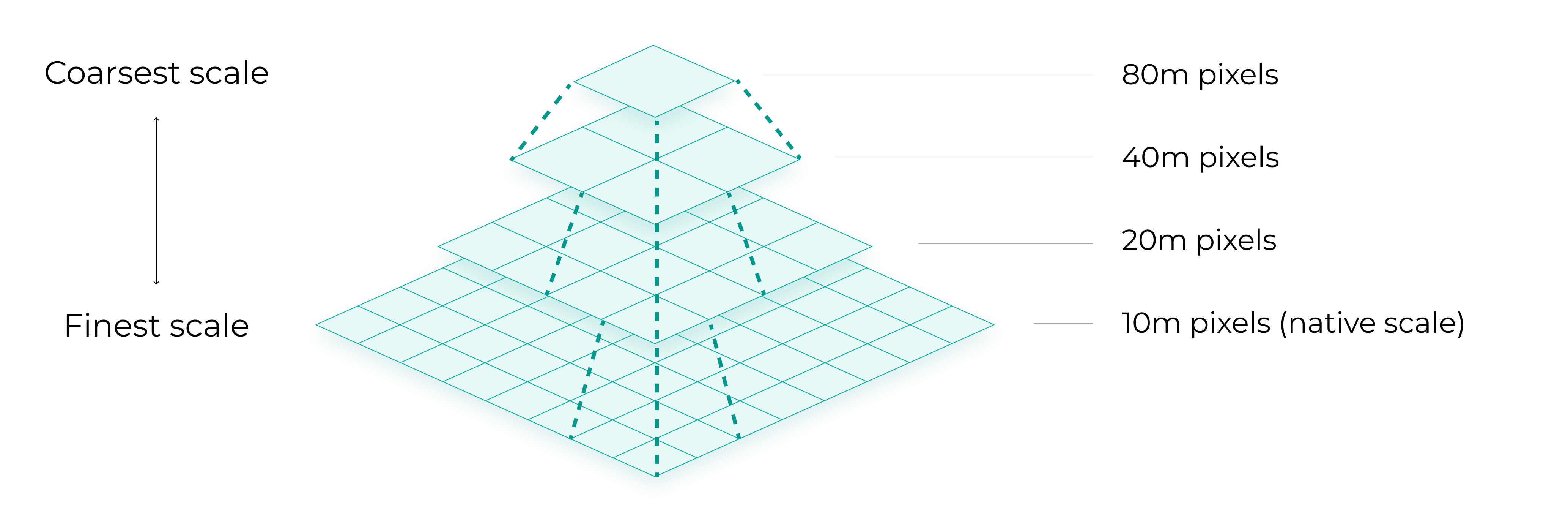
When the scale for a workflow is made coarser, the size of the pixels increases. This happens in a pyramid system from the finest, native scale at the bottom to coarsest scale at the top. The value for the scaled pixel is determined differently depending on whether the image is continuous or discrete.
Continuous (numeric) images
A pixel value at each layer of the pyramid is the mean of the four pixels at the level below.
/5%20Scale%20-%20numeric.png?width=670&height=215&name=5%20Scale%20-%20numeric.png)
Discrete (thematic) images
A pixel value at each layer of the pyramid is a sample (usually the top left pixel) of the four pixels at the level below.
/6%20Scale%20-%20discrete.png?width=670&height=215&name=6%20Scale%20-%20discrete.png)
How does workflow scale affect tabular data?
Continuous images: Canopy height example
The accuracy of minimum and maximum calculations are more affected than mean calculations when running at a coarser scale. As you can see in this canopy height example, the maximum height is significantly different when run at the native 10m scale and 20m scale, however, the mean height is unchanged.
/7%20Canopy%20height.png?width=670&height=472&name=7%20Canopy%20height.png)
Discrete images: Landcover example
At coarser scales, less frequently occurring values, (such as urban cover in this example) are more likely to disappear. In this land cover example, the result when running at a 20m scale doesn't include any urban landcover.
/8%20Land%20cover.png?width=670&height=567&name=8%20Land%20cover.png)